sales@, support@, hello@ — the patterns that actually work
Role addresses look simple. Most teams set them up as alias-to-one-person and then watch them quietly stop working. Here are the three patterns, when to use which, and the operational habits that keep them alive.
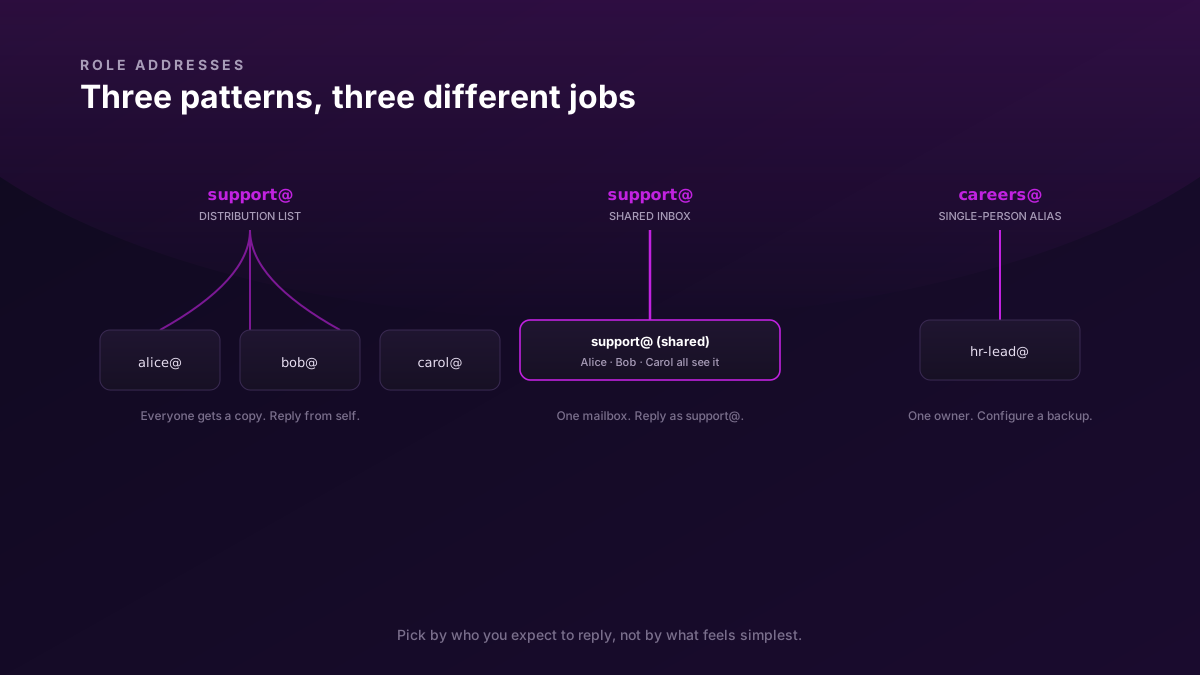
A role address is any email that isn't tied to a person — sales@, support@, hello@, billing@, careers@, security@. They're how customers expect to reach a team rather than guess at who-handles-what. They're also one of the easiest things to set up incorrectly, in a way that quietly fails six months later when the person you aliased it to forgets about it.
There are three real patterns. Most teams need a mix; few teams need all three for the same address.
Pattern 1 — Distribution list (fan-out alias)
A distribution list takes one inbound message and sends it to N people's individual inboxes.
Inbound:  [email protected]
            ↓ (fan out)
            [email protected]   (gets a copy)
            [email protected]     (gets a copy)
            [email protected]   (gets a copy)
Each recipient sees the message in their own inbox. Each can reply directly to the customer; the reply goes from the individual's address.
When this works: small teams where everyone's expected to handle anything, or where the role address is essentially a "ping the whole team" mechanism. founders@, an internal oncall@, a 3-person sales@ early on.
When this breaks: anywhere there's any expectation that one person owns each thread. Everyone reads it; nobody replies because they assume someone else will. The customer's second message arrives 24 hours later, less polite. You'll see this happen and not understand why for the first few weeks.
Setup: any email host. In Biza Email it's an alias with multiple targets; in Workspace it's a Group with members; in Microsoft 365 it's a Distribution List. Same concept, three names.
Pattern 2 — Shared inbox
A shared inbox is one mailbox that multiple people sign into. Inbound mail arrives at one address (support@), lives in one place, and everyone with access sees the same threads with the same statuses.
Inbound:  [email protected]
            ↓
        ┌─────────────────────────┐
        │  Shared support inbox    │  ← Alice, Bob, Carol all see this
        │  ☐ 3 unread             │     and reply from support@
        │  ☐ Customer thread #42  │
        │  ☑ Customer thread #41  │
        └─────────────────────────┘
The big difference from a distribution list: replies go out as support@, not as Alice's individual identity. Customers see "[email protected]" reply to them; they don't see "Alice from Yourcompany" unless Alice signs her name in the body.
When this works: anywhere customers expect a team response (support@, billing@, help@). Anywhere you need history — what did we tell this customer last month? Anywhere multiple people need to triage or hand off threads. Anywhere you might want to add a CRM later, because shared-inbox tools usually grow into ticketing systems.
When it doesn't work: as a notification dump (calendar invites, status emails, automated alerts). Those drown the actual customer threads. Set up filtering so notifications go elsewhere.
Setup: Biza Email supports shared inboxes as a first-class concept — you grant team access to a single mailbox. Workspace approximates this with delegated access on a regular mailbox. Dedicated tools (Front, Help Scout, Missive) layer extra workflow on top of any IMAP mailbox.
Pattern 3 — Single-person alias (the "forward to one")
This is the simplest pattern: [email protected] is an alias to [email protected]. One inbound rule, one human owner.
When this works: addresses that genuinely belong to one role-with-one-person right now. careers@ when there's one person hiring. legal@ when there's a single counsel. press@ when the founder handles all press.
When it breaks: the day that one person leaves, goes on vacation, or gets too busy. If the address is alias-to-one-person, you've made a single point of failure that customers have no way to know about. They send to careers@, it lands in someone's mailbox who is no longer paying attention, and you don't find out until someone tweets about being ghosted.
Setup: plain alias on any email host. Takes 30 seconds.
Which to use when
The simple rule:
- >1 person should reply, but only one at a time → shared inbox
- Everyone should see it, anyone can reply → distribution list
- Genuinely one person owns it right now → single-person alias, with a known successor configured
The third clause matters. Anywhere you have a single-person alias, write down — somewhere not buried in someone's head — who the backup is and who's responsible for repointing the alias when the primary leaves.
The auto-reply trap
The single most common role-address mistake: setting up an auto-responder on support@ that just says "thanks, we'll get back to you soon" — and then letting it sit unmonitored.
The problem is that the auto-reply itself stops you from noticing the address is broken. Customers get a polite "we got it"; no human ever follows up; the customer assumes you're slow rather than dead. By the time you notice, you have a month of unanswered enquiries and no efficient way to apologise to them all.
Either commit to a real SLA backing the auto-reply ("we reply within one business day" — and actually do), or don't set up an auto-reply at all. A bounce or a silent receipt is more honest than a comforting lie.
Handoff hygiene for shared inboxes
Once your shared inbox has more than 2 people, handoff patterns become the operational backbone. Three habits that work:
Assignment. Either via your provider's built-in feature (some shared-inbox apps) or via a simple convention: the person who replies first "claims" the thread. Everyone else moves on. If nobody claims, the address-owner triages once a day.
Internal notes. Add comments visible only to the team, not the customer. "Talked to Alice in support — this customer is on the Pro plan, give them priority." Most shared-inbox tools support this directly; in plain IMAP setups, an internal forward to a
team-only@distribution list serves the same purpose.Status tracking. Open / Pending / Resolved is enough for most teams. You don't need a full ticketing system at 5-person scale; a labels/folders convention suffices. Past 20 customer threads/day, look at a dedicated tool (Front, Help Scout, Missive, Plain).
Hygiene: when to retire an address
Every role address eventually outlives its purpose. Two failure modes to avoid:
The vestigial
info@. Set up by a founder in 2018, points at someone who hasn't worked there since 2022. Mail still arrives. Nobody reads it. Stop publishing it; either retire it (bounce inbound) or repoint it to a still-monitored shared inbox.The proliferation.
support@,help@,customer-care@,customers@,service@. Customers don't know which to use. Pick one canonical address per function and alias the rest into it. Listing six contact addresses on your site looks thorough; it actually creates more failure modes.
A quick audit ritual every 6-12 months: list every public role address, who owns each, when it was last replied-to, and whether the auto-reply (if any) is still accurate.
Biza Email supports shared inboxes and unlimited aliases in the base plan. If that's the model you're moving toward, the Features page covers what's available.