Reading email headers: a practical tour
When mail mysteriously lands in spam, when a sender swears they replied but you don't see it, when a forwarded message gets stripped — the answer is always in the headers.
Every email message is split into two parts: the body (what you read) and the headers (the routing slip and audit trail). You see the headers mostly when something is broken — a message goes to spam, a reply doesn't arrive, a forwarded mail strips its attachments. The headers explain why, every time.
This is a practical tour: what the important headers actually mean, how to read them in the order that matters, and a worked example of debugging a spam-folder delivery from headers alone.
How to view headers
Every mail client hides them by default. The path is buried but never far:
- Gmail / Workspace web: open message → three-dot menu → Show original
- Apple Mail (macOS): open message → View menu → Message → All Headers
- Outlook web: open message → three-dot menu → View → View message source
- Biza Email web: open message → ⋮ → View source
- Thunderbird: View → Headers → All
Headers are plain text. They look intimidating because there are 30-40 of them and they're machine-formatted. You only need to read 6.
The six headers that matter
1. Received: — the routing trace
Multiple Received: headers, one per mail server the message passed through, prepended (so the newest is at the top, the oldest at the bottom). To read the message's path in chronological order, start at the bottom of the Received chain.
Received: from smtp.example.com (smtp.example.com [203.0.113.10])
        by mx1.biza.email (Biza-MX/1.4) with ESMTPS id ABC123
        for <[email protected]>; Sat, 17 May 2026 09:14:22 +0000
Received: from authoring-host.example.com (authoring-host.example.com [203.0.113.42])
        by smtp.example.com (Postfix) with ESMTPSA id DEF456
        for <[email protected]>; Sat, 17 May 2026 09:14:18 +0000
Read bottom-up: the message was first composed on authoring-host, handed to smtp.example.com for outbound delivery, which connected to Biza's mx1 server, which then handed it to the user's mailbox. Each hop adds latency (delta between timestamps). If delivery takes 30+ minutes and the Received chain has only 2-3 hops, something is queueing somewhere.
2. Authentication-Results: — the SPF/DKIM/DMARC summary
The single most useful header when debugging deliverability. The receiving server's verdict on whether the message authenticated:
Authentication-Results: mx1.biza.email;
        spf=pass (sender IP is 203.0.113.10) smtp.mailfrom=example.com;
        dkim=pass header.d=example.com header.s=mail2024;
        dmarc=pass action=none header.from=example.com
Three independent verdicts. pass is what you want. Common failure modes:
spf=softfailorspf=fail— the sending IP isn't on the domain's allow-list. The sender's SPF record needs updating, not yours.dkim=fail— the message was modified in transit (often by an over-aggressive mailing-list footer-adder or virus scanner) and the signature no longer matches the body.dmarc=fail— at least one of SPF/DKIM failed and the failing protocol isn't aligned with the From header domain. If the domain hasp=quarantineorp=reject, this is why the message went to spam (or vanished).
If you're debugging outgoing mail landing in someone else's spam, ask the recipient to share the Authentication-Results: header. It tells you exactly which authentication mechanism is failing.
3. Return-Path: vs From: — and why they differ
The From: header is what the user sees. The Return-Path: (also called the "envelope sender" or "bounce address") is where bounces get routed. They're often the same address — but they don't have to be, and the spec doesn't require it.
From: Alice Smith <[email protected]>
Return-Path: <[email protected]>
This is normal for transactional / marketing mail sent through a third-party (Mailgun, Postmark, Resend, etc.) — the visible From is your address; bounces route to the sender's bounce-handling system. For SPF alignment under strict DMARC, the Return-Path domain has to match the From domain, which is why providers expose options like "use your domain for bounces".
4. Message-ID: — the unique fingerprint
Every message has a unique ID, assigned by the originating server:
Message-ID: <[email protected]>You use this to:
- Identify the exact message if you've forwarded it to support
- Trace a thread (replies should reference this in
In-Reply-To:orReferences:) - Debug duplicates (same Message-ID arriving twice means something looped)
5. In-Reply-To: and References: — the threading chain
When you reply to a message, the client adds the original Message-ID to In-Reply-To: and appends to References:. Mail clients use these to group conversations into threads.
In-Reply-To: <[email protected]>
References: <[email protected]>
            <[email protected]>
If replies aren't threading correctly ("I see your reply, but it's a separate conversation"), the culprit is usually a sender's mail client stripping these on reply. This is rare; when it happens, it's almost always a misconfigured automated reply system.
6. Subject:, Date:, From:, To:, Cc: — the obvious ones
You already know these. The only non-obvious thing: Date: is set by the originating client and can be wrong (system clock skew). Received: timestamps are more reliable for forensic ordering.
A worked example: "my mail went to spam"
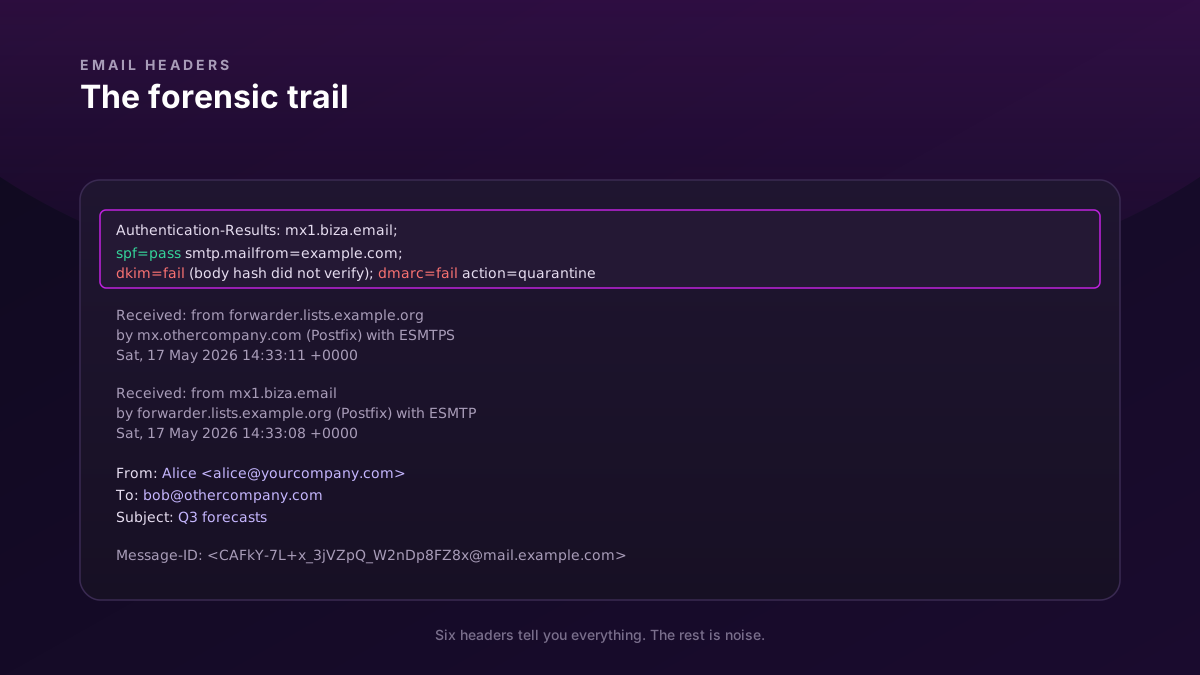
You sent a message from [email protected] to a friend at [email protected]. Bob says it went to spam. You ask Bob to share the headers. Here are the relevant ones:
Authentication-Results: mx.othercompany.com;
        spf=pass smtp.mailfrom=yourcompany.com;
        dkim=fail (body hash did not verify) header.d=yourcompany.com;
        dmarc=fail action=quarantine header.from=yourcompany.com
Received: from forwarder.lists.example.org (forwarder.lists.example.org [192.0.2.50])
        by mx.othercompany.com (Postfix) with ESMTPS
        for <[email protected]>; Sat, 17 May 2026 14:33:11 +0000
Received: from mx1.biza.email (mx1.biza.email [203.0.113.20])
        by forwarder.lists.example.org (Postfix) with ESMTP
        for <[email protected]>; Sat, 17 May 2026 14:33:08 +0000
What the headers tell us:
- The message went
your provider → forwarder.lists.example.org → recipient. That extra hop is a mailing-list forwarder (Bob is on a list that forwards mail to him). - SPF passed (the original sender's IP was authorised).
- DKIM failed: "body hash did not verify". The forwarder added a
List-Unsubscribefooter or similar, modifying the body, which broke the DKIM signature. - DMARC therefore failed (DKIM is unaligned, SPF passed but the envelope-sender domain after forwarding is no longer
yourcompany.com). - Your domain's DMARC policy is
quarantine, so the receiving server moved it to spam.
The fix isn't on your side — you authenticated correctly. The failure is the forwarder modifying the body. The standard solutions: the forwarder uses ARC (Authenticated Received Chain) to re-sign on its way out, or recipients add a known-trusted-forwarder allowlist. ARC is widely deployed by 2026 and most mailing-list forwarders support it; if Bob's list doesn't, this is a known limitation.
Without the headers, you'd have spent hours wondering why one specific recipient kept getting your mail in spam. With them, you read three lines and know exactly what's happening.
What headers don't tell you
- Whether the content was suspicious (most spam filtering is content-based; headers only tell you about authentication and routing)
- What's inside attachments (they're encoded in the body)
- Which exact spam rule fired in the recipient's filter (some include an
X-Spam-Score:header, but it's non-standard)
Headers are for routing and authentication forensics. For content debugging, you need the message body and ideally the recipient's mail-filter logs.
Setting up SPF / DKIM / DMARC correctly avoids most of the issues that show up in headers. We covered all three in the previous post.