What an SSO-first email setup looks like (and why it matters)
If your team is using passwords for email, you have a problem you'll discover at exactly the wrong moment. Here's the SSO-first alternative — what it changes day to day and why it pays for itself the first time someone leaves.
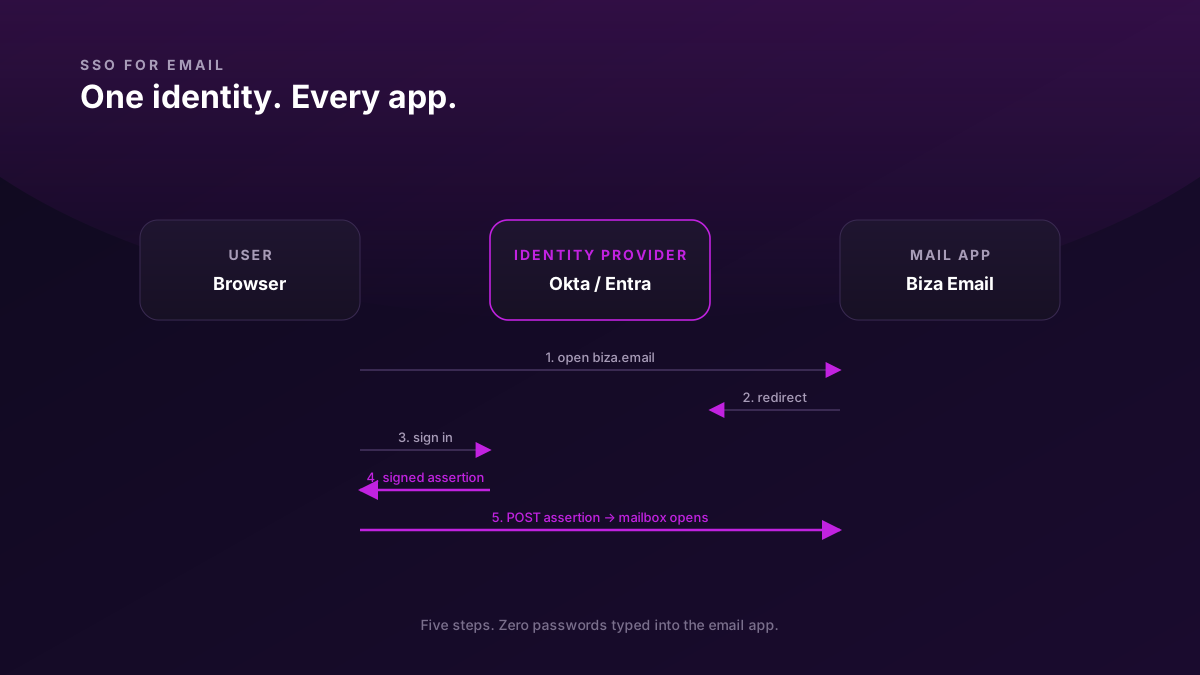
Most growing teams put off SSO for email because the day-one setup looks like overhead. Five people, five passwords — fine. Twenty people, twenty passwords — still fine, technically. Forty people across three offices, with one ex-engineer who never returned their laptop — that's the moment you realise SSO would have paid for itself five times over.
This is a short tour of what an SSO-first email setup actually looks like, written for the technical person who has to decide whether to set it up now or later.
The shared-password problem
When email logins are individual passwords:
- Every account has its own credential, set by the user, often reused from somewhere else
- Onboarding a new hire means creating an account and communicating the password securely
- Offboarding a leaver means resetting that password before they can log in from home — which only works if the leaver doesn't open the app first
- Compromise of one mailbox tells you nothing about other mailboxes
- 2FA enforcement is per-account, and you can't centrally check who has it on
- The audit trail of who-signed-in-from-where is per-mailbox, in N different log views
You can run this way at small scale. Past 15-20 people you're spending real time on it, and you're carrying real risk you can't see directly.
What SSO actually is
Single Sign-On means your team authenticates against one identity provider (IdP) — Okta, Google Workspace as an IdP, Microsoft Entra, Auth0, etc. — and that IdP issues a signed assertion to each app, including email. The app trusts the assertion; the user never types a password into the app itself.
There are two main protocols:
- SAML 2.0 — XML-based, older, ubiquitous in enterprise. Pretty verbose to configure but well-supported.
- OIDC (OpenID Connect) — JSON-based, modern, the default for newer apps. Simpler config.
Functionally they do the same job. Most apps support both; you pick whichever your IdP is most fluent in.
What happens on a typical sign-in
1. User opens Biza Email web app.
2. App asks "who are you?" → user types [email protected]
3. App recognises the domain, redirects browser to the IdP
4. IdP (already remembers the user from their morning Okta sign-in) issues
   a signed SAML assertion: "this is Alice, valid until 6pm"
5. Browser POSTs the assertion back to the app
6. App verifies the IdP's signature, opens Alice's mailbox
Alice never sees a password screen. Her mailbox just opens. The whole flow takes under a second when the IdP session is fresh; 5-10 seconds when she's signing in to the IdP for the first time that day.
What the setup looks like, end to end
For most teams with a modern IdP and a modern email host, full setup is one afternoon's work. The flow is:
1. Choose the IdP and protocol. If you're already on Okta or Entra for other apps, use that. SAML is the safer bet for the next 5 years; OIDC is fine if both ends are modern.
2. Create the application entry in the IdP. You'll paste two URLs you got from the email provider:
- ACS (Assertion Consumer Service) URL — where the IdP POSTs the assertion
- Entity ID — a stable identifier for the email app
3. Configure the email side. Paste back from the IdP:
- IdP metadata URL (or the raw XML if it doesn't expose a metadata endpoint)
- The signing certificate (in metadata, normally)
- The claim mapping: which IdP attribute maps to the user's email (
NameIDoremailclaim)
4. Test with one user. Sign that user in via SSO. Verify their mailbox opens. Verify their session survives a browser refresh.
5. Enforce SSO for the domain. Most providers have a "require SSO for this domain" toggle. Flip it after the first user works. Existing password sessions stay alive but no new password sign-ins are accepted.
6. Communicate the change. Two-line email to the team: "From tomorrow, sign in via [Okta link]. Bookmark this."
What changes when someone joins
In an IdP-managed setup, you don't create the email account first and then communicate a password. The IdP provisions the user — sometimes via SCIM (a standard "user lifecycle" protocol the IdP and email host both speak) — and the mailbox materialises automatically. The user signs in via SSO the first time and the mailbox is just there.
This means onboarding is one workflow, not two. The same Okta button that grants someone access to Notion, Slack, GitHub, and the cloud console also creates their email account.
What changes when someone leaves
This is the part that pays for everything else.
In a password setup, offboarding is: HR tells you the leaver's last day, you remember to deactivate the email account that morning, hopefully before they decide to open the app from home and download whatever they want. Half the work is the remembering.
In an SSO setup, offboarding is: HR deactivates the user in the IdP. That single action revokes the user across every app in the IdP, including email. The user's existing email session times out within minutes (whatever the IdP session lifetime is — often 8 hours; configurable down to seconds for offboarding scenarios). New sign-in attempts fail at the IdP redirect.
You also get a deterministic audit log: the IdP has a record of every sign-in across every app, with IP, device, and timestamp. If someone alleges they accessed something after their last day, you have proof either way.
The audit log you didn't have before
Email-host audit logs are useful, but they only show events at the mailbox layer (sign-ins, message access, send/receive). The IdP's log is broader and more useful for security review:
2026-05-17 14:33:11Z  [email protected]   ssolved on    203.0.113.42 / macOS 14 / Chrome 142
2026-05-17 14:33:14Z  [email protected]   accessed app  Biza Email
2026-05-17 14:33:14Z  [email protected]   accessed app  Notion
2026-05-17 14:33:15Z  [email protected]   accessed app  GitHub
When you run a security review after an incident, this is the single source of truth: who, where, when, what apps. Without SSO you'd be reconciling logs from 10 different SaaS products and a couple of cloud consoles, none of which agree on user identity.
When the up-front cost actually makes sense
Honest answer: SSO is mild overhead at 5 people, slightly worth-it at 15, clearly worth-it at 30, mandatory at 50+. The crossover for most teams is somewhere between "the second hire who works remotely full-time" and "the first quarter where someone leaves and you weren't fully ready".
The cheap way to think about it: if you'd lose more than two days of person-time to a moderate security incident, SSO is the right insurance. Two days of senior engineer time is more expensive than the IdP licence.
What SSO doesn't do
- It doesn't replace 2FA on the IdP itself. Your IdP is now the single critical credential — protect it like one. Hardware-token 2FA on the IdP for admin accounts, push-based or TOTP 2FA for everyone else.
- It doesn't protect against a compromised IdP session (browser stolen, laptop unlocked). Audit-log review and short session lifetimes mitigate this; nothing eliminates it.
- It doesn't migrate existing mailbox state. Existing mailboxes keep working — only the authentication part changes.
Why providers offer it in different tiers
A small note on pricing: many email hosts charge extra for SSO (Google Workspace, Microsoft 365, Fastmail). Their argument is that SSO-using teams are bigger and willing to pay more. The structural argument is that SSO is a security feature your team needs the same year you need email at all, and pricing it as a premium tier is misaligned. We chose to put SSO in the base plan at Biza Email for exactly this reason — the team that needs SSO most is the one that hasn't yet hit the seat tier where it gets unlocked.
If you're comparing email hosts and SSO availability matters, the comparison hub lays out which providers include SSO at which tier.