SPF, DKIM, DMARC: what each actually does — with examples
Three records, three jobs. A practical tour with the exact DNS lines you'll publish — and the order to adopt them in without breaking deliverability.
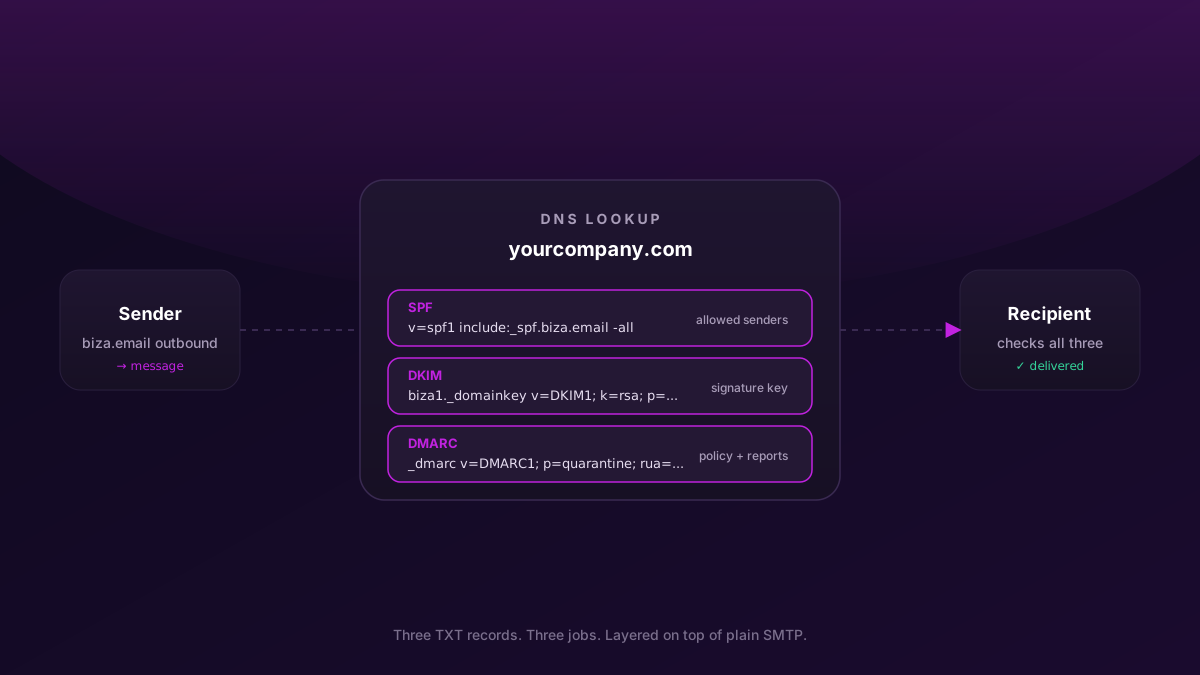
Three letters, three letters, five letters. They show up in every "set up your domain for email" checklist, usually with the same advice: publish all three. That's correct. But you'll set them up better — and recover faster when something breaks — if you understand what each one actually does.
Here's the plain-English version:
- SPF answers "who is allowed to send mail from this domain?"
- DKIM answers "can the recipient prove this message wasn't tampered with on the way?"
- DMARC answers "if SPF or DKIM fail, what should the recipient do, and where do they tell me about it?"
That's it. They're three independent checks layered onto plain SMTP, designed to make spoofing your domain harder. We'll go through each one in order, with the actual DNS records you'll publish.
SPF — who is allowed to send for you
SPF (Sender Policy Framework) is a TXT record on your domain that lists the servers and services authorised to send mail with your domain in the From: address. When a recipient receives mail claiming to be from [email protected], they look up yourcompany.com's SPF record and check whether the sending IP is on the allow-list.
A minimal SPF record for a domain that only sends mail via Biza Email:
yourcompany.com. TXT "v=spf1 include:_spf.biza.email -all"Three pieces:
v=spf1— the SPF version. Always this.include:_spf.biza.email— delegates the actual allow-list to the_spf.biza.emailrecord (which lists Biza's outbound IP ranges). Your record stays tiny and stable even when our IP set changes.-all— hard-fail anything not matched. Reject mail from other sources. The alternative is~all(soft-fail / quarantine), which is more forgiving while you're still rolling things out.
If you also send marketing email through, say, Resend and transactional email through Postmark, the record grows:
yourcompany.com. TXT "v=spf1 include:_spf.biza.email include:_spf.resend.com include:spf.mtasv.net -all"The single biggest SPF pitfall
SPF resolution has a 10-DNS-lookup limit. Every include: counts. Every nested include: inside those counts too. Once you hit 11, the whole record evaluates as PermError and your mail starts landing in spam folders — without any visible error in your own tools.
Audit your real lookup count with an external tool like mxtoolbox SPF lookup any time you add a third sending service. If you cross 8, plan ahead — most teams use spf-flatten-style automation, or stop adding new SaaS senders.
DKIM — proving the message wasn't tampered with
SPF says "this IP is allowed to send for me". It says nothing about whether the message body was modified in transit, or whether someone is forging the sending IP. That's what DKIM (DomainKeys Identified Mail) is for.
DKIM works with public-key cryptography. When Biza Email sends a message on your behalf, it signs key headers (and a hash of the body) with a private key we hold. The recipient looks up the matching public key in your DNS and verifies the signature. If the verification fails — because the body was modified, or because the message was sent by someone who doesn't have the private key — DKIM fails.
You publish the public key under a selector. The selector lets you have multiple active keys at once (so you can rotate them without downtime). A DKIM record looks like this:
biza1._domainkey.yourcompany.com. TXT "v=DKIM1; k=rsa; p=MIGfMA0GCSqGSIb3DQEBAQUAA4GNADCBiQKBgQDCo7..."Pieces:
biza1._domainkey— the selector (we pick this; you publish it as the hostname). The double prefix is required by the DKIM spec.v=DKIM1— the version. Always this.k=rsa— the key algorithm. RSA is universal.p=...— the actual public key, base64-encoded.
You don't generate this — Biza Email gives you the exact line to paste. Same for any provider. If you ever see a tutorial telling you to generate your own DKIM keys, that's only relevant for self-hosted mail; managed providers handle key generation and rotation.
Why selectors matter
When we rotate a DKIM key (which we do periodically), we publish a new selector (biza2._domainkey...) alongside the old one. Outgoing mail starts signing with the new key; old in-flight mail continues to verify against the old key. After a grace period, we drop the old selector. You add new selectors when we tell you to; you don't remove old ones unless we say so.
DMARC — what to do when SPF or DKIM fail
SPF and DKIM are checks. They can pass, fail, or be missing. DMARC tells the recipient what to do with the result — and gives you a reporting channel so you can see what's actually happening to mail claiming to be from your domain.
A starting DMARC record:
_dmarc.yourcompany.com. TXT "v=DMARC1; p=none; rua=mailto:[email protected]; adkim=s; aspf=s"The important pieces:
p=none— report only. Don't change recipient behaviour yet. Just collect data. This is the right starting policy for the first 2-4 weeks after publishing SPF and DKIM.p=quarantine— send failures to spam. Move to this once your reports show consistent SPF + DKIM alignment from all your legitimate senders.p=reject— bounce failures outright. The end goal. Move here only afterp=quarantineis stable and you're confident no legitimate mail is failing.rua=mailto:[email protected]— daily aggregate reports get emailed here. You'll want a parser (Postmark's DMARC Digests is free; or services like Valimail / dmarcian). Plain-text XML in your inbox is unreadable.adkim=s/aspf=s— strict alignment. The domain in the DKIM signature / SPFFrom:must exactly match theFrom:header domain, not just a parent. Most managed providers set things up so strict alignment works, and it closes a whole class of subdomain-spoofing attacks.
The right adoption order
Going straight to p=reject is how teams lose a week of legitimate mail. The order that actually works:
- Publish SPF and DKIM.
- Wait 24-48 hours for DNS to propagate.
- Publish DMARC with
p=none. Let aggregate reports accumulate for 2-4 weeks. - Read the reports. Identify every legitimate sender that's misaligned (marketing tool with the wrong return-path, forwarded mail from an old alias, a contractor still sending from a personal SMTP, etc.) and fix each one.
- Move to
p=quarantinefor another 2-4 weeks. Monitor for any legitimate mail landing in spam. - Move to
p=reject.
That's a 2-3 month rollout for a typical org. Anyone who tells you it's faster is selling something.
A complete example
Putting it all together for yourcompany.com using Biza Email:
yourcompany.com.                  TXT   "v=spf1 include:_spf.biza.email -all"
biza1._domainkey.yourcompany.com. TXT   "v=DKIM1; k=rsa; p=MIGfMA0GCSqGS..."
_dmarc.yourcompany.com.           TXT   "v=DMARC1; p=none; rua=mailto:[email protected]; adkim=s; aspf=s"
That's the minimum. After you've watched DMARC reports for a few weeks and fixed any alignment issues, the only line that changes is the DMARC one — p=none becomes p=quarantine, then p=reject.
What this gets you, what it doesn't
Gets you: dramatically harder spoofing of your domain (which is most of what email security means in practice), much better deliverability into Gmail / Outlook / corporate gateways (they downrank mail without SPF + DKIM + DMARC), and an early-warning system for any new sender pretending to be you.
Doesn't get you: end-to-end encryption (SPF/DKIM/DMARC say nothing about whether the message body is encrypted at rest or in transit beyond TLS), protection from someone compromising one of your real mailboxes and sending mail with valid SPF + DKIM + DMARC, or any defence against malicious links inside otherwise-legitimate mail.
These three records are the table-stakes. Once they're in place, the next layers — MTA-STS, BIMI, DANE — start to matter. We'll cover those in a later post.
Setting up Biza Email walks you through every record above. If you're stuck on a specific provider's DNS UI, the migration playbook has the registrar-specific notes.