How to migrate 50 mailboxes from Google Workspace in a week
A day-by-day playbook for moving team email off Google Workspace without losing mail, breaking deliverability, or paying a migration consultancy.
Switching email providers feels like changing the engine on a moving car. You have 50 people sending and receiving mail right now, every business hour. The fear is real — and it's why migration projects routinely drag for months and cost five figures in professional services.
It doesn't need to. A team of 50 can move from Google Workspace to a new provider in a calendar week without inbox downtime and without paying anyone outside the team. Here's the playbook we ship to every migrating customer, distilled to the parts that actually matter.
The shape of the week
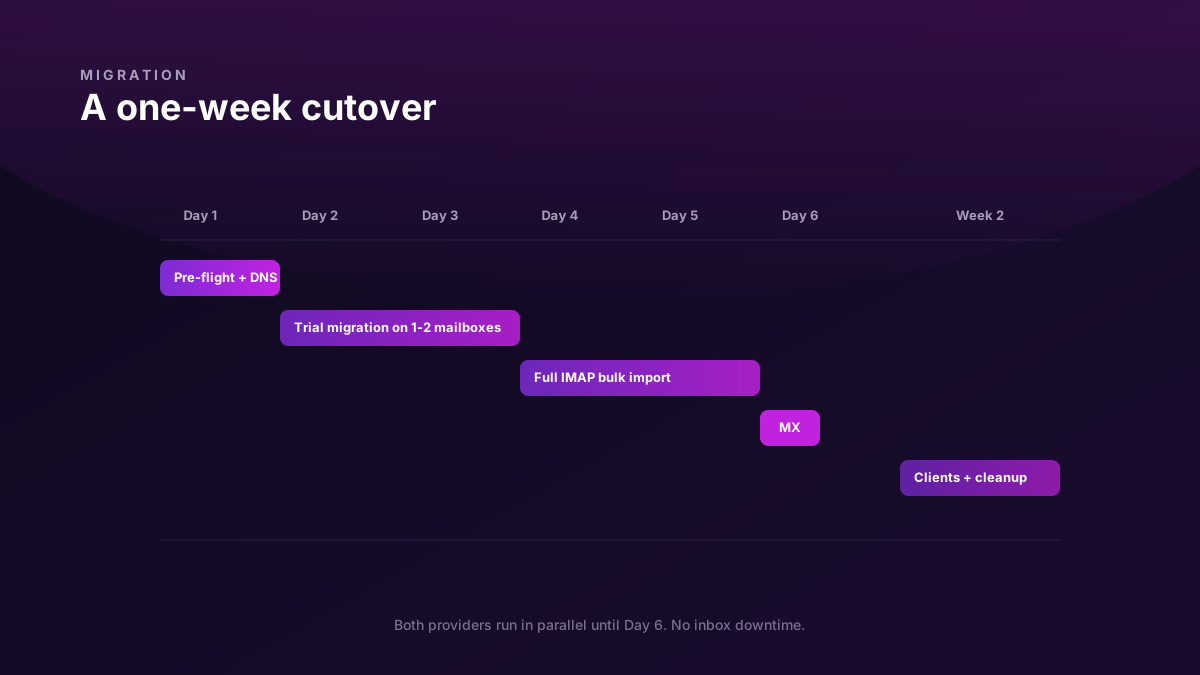
Day 1   Pre-flight: domain added, DNS prep, audit
Day 2   Trial migration: 1-2 non-critical mailboxes
Day 3   Verify trial. Communicate cutover plan to team
Day 4   Bulk IMAP import (runs in background)
Day 5   Verify mail counts. Final dry-run of MX flip
Day 6   MX flip during a quiet hour. New mail arrives at Biza
Week 2  Reconfigure clients. Retire Workspace mailboxes
The trick is that mail keeps flowing on Workspace the whole time until Day 6. Nothing is "moved" in a one-shot disruptive event. We're running two providers in parallel and then switching the forwarding address (your MX record) at the end.
Day 1 — Pre-flight
Goals: domain added to new provider, DNS records drafted (not published), inventory of existing mailboxes and aliases.
1. Add your domain to the new provider. This is normally a 5-minute step. The provider gives you a verification TXT record. Publish it; wait for propagation; click Verify.
2. Inventory what you have on Workspace. Use the Workspace Admin Console → Users export, plus a list of aliases and groups (sometimes called "distribution lists"). You're looking for:
- Active users (these become mailboxes)
- Aliases on each user
- Groups that act like role inboxes (
sales@,support@) - Calendar resources, group calendars (these don't migrate — note them separately)
3. Draft your new DNS records. Don't publish MX yet. Draft these so they're ready to paste:
biza1._domainkey.yourcompany.com.  TXT   "v=DKIM1; k=rsa; p=..."   ← from new provider
yourcompany.com.                    TXT   "v=spf1 include:_spf.biza.email include:_spf.google.com -all"
_dmarc.yourcompany.com.             TXT   "v=DMARC1; p=none; rua=mailto:[email protected]"
Notice the SPF record includes both the new provider and Google. During the migration week, both will be sending legitimately on your behalf, and you want both to pass SPF. We narrow this back down to just the new provider in Week 2.
4. Publish DKIM and the dual-include SPF now. Don't touch MX yet. This is a no-disruption change — Workspace doesn't care that you've added a new DKIM selector under a different _domainkey subdomain.
Day 2 — Trial migration on 1-2 mailboxes
Goals: prove the migration tooling works against your actual data, before betting the whole team on it.
Pick 1-2 mailboxes that won't break the business if something goes weird: a founder's own mailbox, or a dormant role inbox. Create matching mailboxes on the new provider with the same email address. (Yes, the address is the same — both providers can host [email protected] simultaneously; the eventual MX record determines where new mail lands.)
Run the provider's IMAP import tool. You provide:
- Source: Workspace IMAP host (
imap.gmail.com), the mailbox's address, and an app password (Workspace makes you generate one if 2FA is on) - Destination: the new mailbox
The tool reads every message from Workspace, replays it into the new mailbox, preserving folders/labels, read state, attachments, and threading. It usually runs at 10-50 messages per second per mailbox. A 5-year mailbox with 50,000 messages takes a few hours.
Verification checklist for the trial:
- Message counts match (give or take spam/trash, which most tools skip by default)
- Folder / label structure matches
- Read state is preserved (unread count similar)
- A few sampled threads render correctly with attachments
- Search returns the same hits for a few known queries
If anything's off, find out why now, not on Day 5 with 49 more mailboxes loaded up.
Day 3 — Communicate the plan
Goals: every team member knows what's about to change and when.
This is the soft part of the migration that gets skipped and then haunts the rest of the week. Send a single, well-formatted email to the whole team:
- "We're moving our email from Google Workspace to Biza Email"
- The date and approximate hour of the MX flip (Day 6, suggest a Friday evening or weekend morning if your business is M-F)
- "Your address doesn't change. Your password may change — instructions follow."
- "Your old mail will all be there. Your folders / labels will be there. You don't need to do anything before the cutover."
- Link to a 1-pager with reconfiguration steps for the four mail clients your team actually uses
The day-of post-flip email is just "we've flipped MX, here's how to log in." Keep both crisp.
Day 4-5 — Bulk import
Run the IMAP import for every remaining mailbox in the background. Most providers parallelise — you can run 20+ imports simultaneously. The provider keeps a running log of what's complete and what's still in progress.
While this runs, you do nothing. Workspace continues to receive new mail. The new provider has the historical mail being copied in. Nobody on the team notices anything different.
Spot-check 5-10 mailboxes once the bulk import finishes. Same verification checklist as Day 2.
Day 6 — The MX flip
This is the one moment where things actually change.
At a quiet hour (Friday evening, weekend morning, public holiday — whatever fits your business cadence):
- Update your MX records to point at the new provider's mail servers. Workspace's old MX records get deleted.
- DNS propagates. With a 1-hour TTL, you'll see most of the world switch over within 60-90 minutes. With longer TTLs, it can take several hours.
- New mail starts arriving at the new provider. Workspace stops receiving (because nobody is routing to its servers anymore).
- Some senders with cached DNS may still hit Workspace for a few hours. Most providers keep a "forwarder" feature that auto-forwards any mail received post-cutover into the new mailbox. Enable it if available.
Tip on TTL: 48 hours before Day 6, lower your MX record TTL to 300 seconds (5 minutes). This makes the cutover feel almost instant. Most teams forget this step. It's the single highest-leverage thing you can do for a smooth flip.
Week 2 — Cleanup
- Reconfigure mail clients. Each person points Apple Mail / Outlook / Thunderbird at the new provider's IMAP/SMTP. Most native apps autodiscover via the standard
mail.<domain>patterns. - Verify the dual-include SPF doesn't still include Workspace once you're confident no legitimate mail is going through it. Drop
include:_spf.google.comfrom the SPF record. Wait a few days, check DMARC reports for any unexpected fails. - Cancel Workspace mailbox seats. Many teams keep a single Workspace account for Calendar / Drive if those weren't migrated, then drop the rest.
- Bump DMARC policy from
p=nonetop=quarantineonce you've watched a few days of clean reports.
Common gotchas
Distribution list mail behaves differently across providers. A Workspace Group with 10 members behaves as a single sending identity to the outside world. Most other providers don't reproduce this exactly. If you rely heavily on Workspace Groups, audit them and decide whether to recreate them as shared inboxes, aliases, or actual distribution lists in the new provider. This is the most-common surprise in real migrations.
Folder vs label semantics. Workspace uses labels (a message can have many). Most other systems use folders (a message lives in one). Migration tools handle this by creating a folder for each label and putting the message in the most specific one, with a copy in any others that are non-overlapping. Counts will look right, navigation will feel slightly different. Communicate this in the team email.
Auto-replies, signatures, vacation responders, and Sieve filters do not migrate. Each user re-creates these in the new provider on Day 7. Send a 2-line reminder.
Rollback (it shouldn't come to this)
If something serious goes wrong post-flip, rollback is publishing your old Workspace MX records again. The new provider continues to hold whatever mail arrived during the window where MX was pointed at it; you can re-import that delta later. It's annoying, but it's not unrecoverable.
In our migration playbook we've yet to see a 50-person migration that needed rollback. The dual-running approach makes failure modes contained — at worst you lose an hour of inbound mail while DNS reverts.
What this costs
Provider migration tools are included with most modern hosts (Biza Email included; same is true for most non-Workspace providers). The "consultancy" tier of email migration mostly buys you someone willing to be available at 11pm on the night of the MX flip. That's a real service — just price-check it before you assume you need it.
For a team of 50 with one technical person, a week of partial attention is the right resource estimate. Two people if you want each step double-checked.
If you're comparing Biza Email to Workspace specifically, the vs Google Workspace comparison page has the math and feature trade-offs.